To find businesses without websites, search Google Maps for a trade and a town, such as "barber shops in Bowling Green, KY", and open each listing: the ones with no Website line are your leads. To cover a whole town, export the search to a spreadsheet and filter the Website column for blanks. Below are both methods, and what we found when we checked 3,358 listings in four US cities.
How to Find Businesses Without Websites Near You
By Maps Extractor TeamPublished 16 min read
Key takeaways
- 22% of the 3,358 Google Maps listings we checked had no website of their own: 16% listed none and 6% listed only a Facebook, Instagram or booking page.
- Trade matters most: barber shops (54%) and nail salons (37%) topped the list; roofers (9%) and landscapers (8%) were lowest.
- Smaller cities have more: 38% in Bowling Green, KY against 16% in Houston.
- They're real businesses: a median of 44 reviews, and 95% list a phone number.
- The fastest method is to export a whole Google Maps search to a spreadsheet and filter the Website column.
On this page
- How many businesses still don't have a website?
- How to find businesses without websites on Google Maps
- The faster way: export a whole search and filter it
- What we found in 4 US cities
- How to find businesses without websites near you
- Other places to find businesses without websites
- Which businesses to contact first
- How to pitch a business with no website
- Common mistakes
- FAQ
How many businesses still don't have a website?
Fewer every year, but still plenty. In Clutch's 2025 small business survey, 83% of small businesses had a website, up from 64% in 2018, which leaves 17% with none (Clutch, August 2025). Clutch also found that over a third of the owners without one think a website isn't relevant to them and rely on social media or marketplaces instead.
Google Maps tells a similar story. In November 2026 we exported 32 Google Maps searches, eight trades in four US cities, and checked the Website field of every listing:
- 16% of the 3,358 businesses listed no website at all.
- Another 6% listed a "website" that was really a Facebook or Instagram page, a Linktree, or a booking page on Vagaro, Booksy or a similar platform.
- Together, 22% had no website of their own.
The second group is easy to miss, and it holds some of the best leads: these owners already market online, just on someone else's platform. We break the numbers down by trade and city further down.
How to find businesses without websites on Google Maps
All you need is Google Maps. It's slow, but it's free and shows you exactly what a customer sees.
1. Search a trade and a town
Search the way a customer would: a trade plus a place, for example "plumbers in Columbus, OH" or "nail salons 83702". If you're prospecting where you are, "near me" works too, but naming the place gives you the same results wherever you search from.
Pick trades that run on word of mouth and walk-ins. In our data, barber shops, nail salons and auto repair shops were the least likely to have a site.
2. Open each listing and look for the Website line
Click a business in the results. In the details panel, a listing with a website shows a line with a globe icon and the site's address. A listing without one goes straight from the opening hours to the phone number.
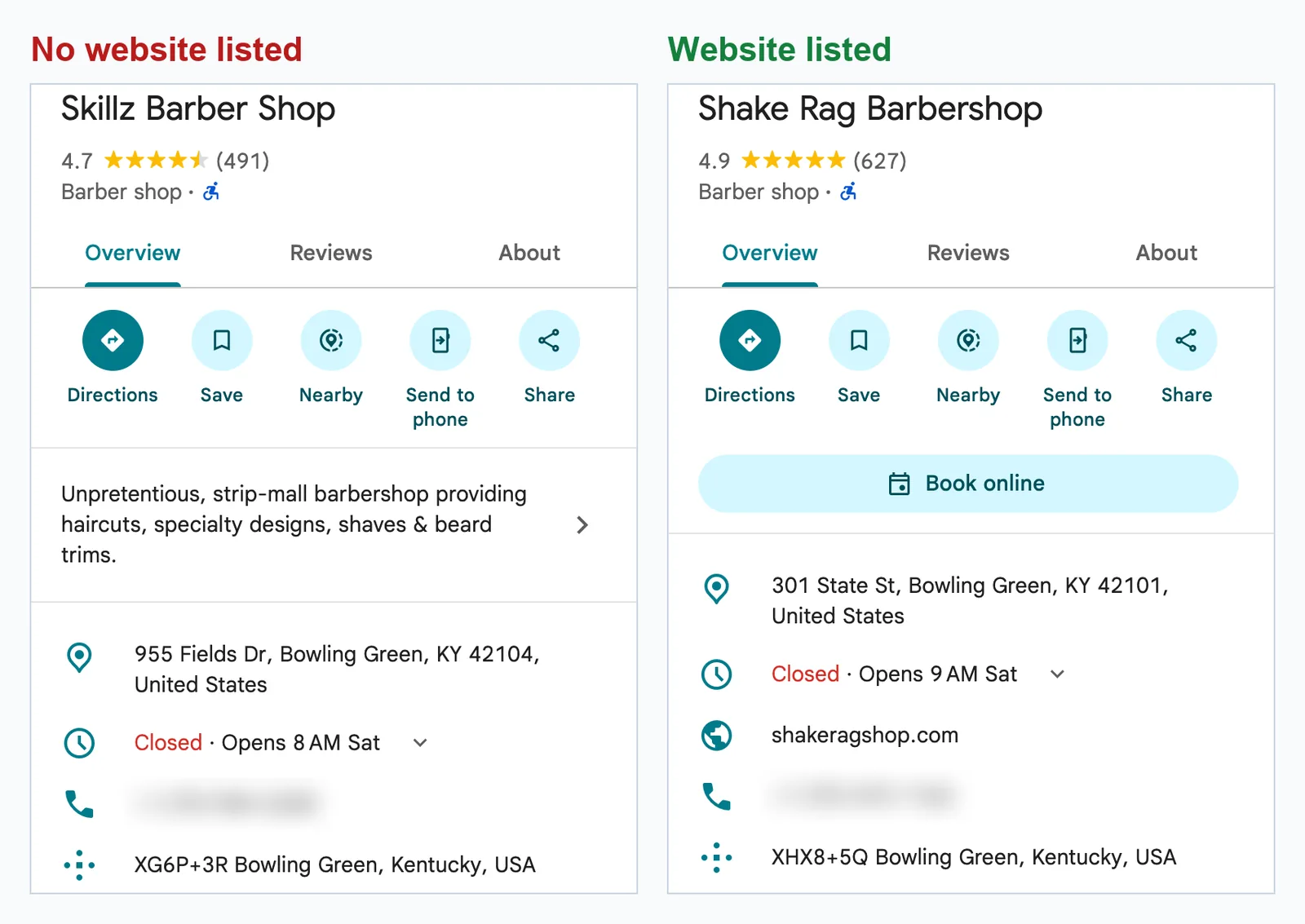
3. Check what the link really points to
A Website line doesn't always mean a real website. Open the link: if it lands on a social profile or a booking page, treat the business as having no website. These were the most common ones in our export:
| The "website" link went to | Listings |
|---|---|
| 52 | |
| Square | 24 |
| GlossGenius | 24 |
| Booksy | 23 |
| Vagaro | 17 |
| 14 | |
| TheCut | 10 |
| Google Sites or a Google page | 9 |
| Linktree | 8 |
That's 181 of the 199 listings in this group; the rest pointed to free Wix or GoDaddy pages, smaller booking tools and a few one-offs.
4. Write down the details
For each business without a site of its own, copy the name, phone number, rating and number of reviews into a spreadsheet. You'll use the rating and reviews to decide who to call first.
Does a missing Website line mean there's no website?
Not always. Owners fill in their own listings, and some never add the link. Before you pitch, take 30 seconds to check:
- Search the business name and town on Google. If a site exists, it usually shows up in the first results.
- Look at their Facebook or Instagram page. The About section or bio sometimes links to a site the Maps listing doesn't.
- See whether the listing is claimed. If Google shows a "Claim this business" link, the owner may never have looked at the listing, so a missing website there tells you less.
We also found Website lines that pointed to directory pages, such as a tourism site's page about the business. Count those as no website too.
The faster way: export a whole search and filter it
Opening listings one by one works for a dozen businesses. For a whole town, export the search instead. Google Maps Extractor is a browser extension that saves every business in a Google Maps search to Excel or CSV, Website column included, so you filter instead of clicking.
1. Install the extension and search
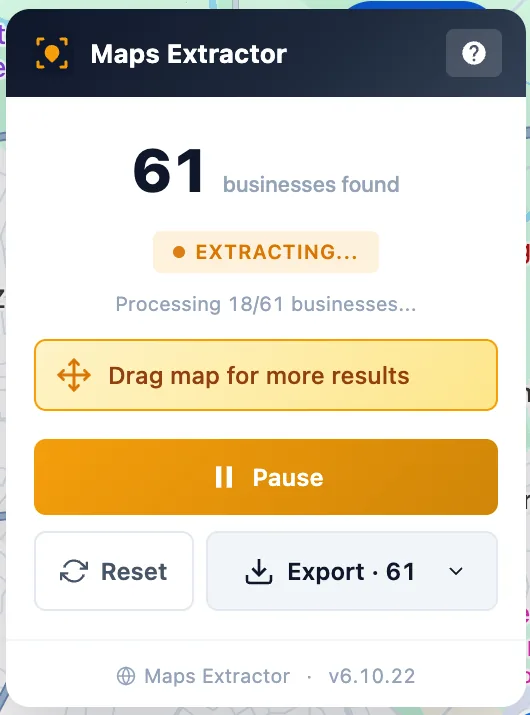
Install Google Maps Extractor in Chrome or Edge, open Google Maps and search for a trade and a place, as above. The Maps Extractor panel appears in the top right corner of the map.
2. Click Start Extracting
The extension scrolls through the results and collects each business while you watch the count go up.
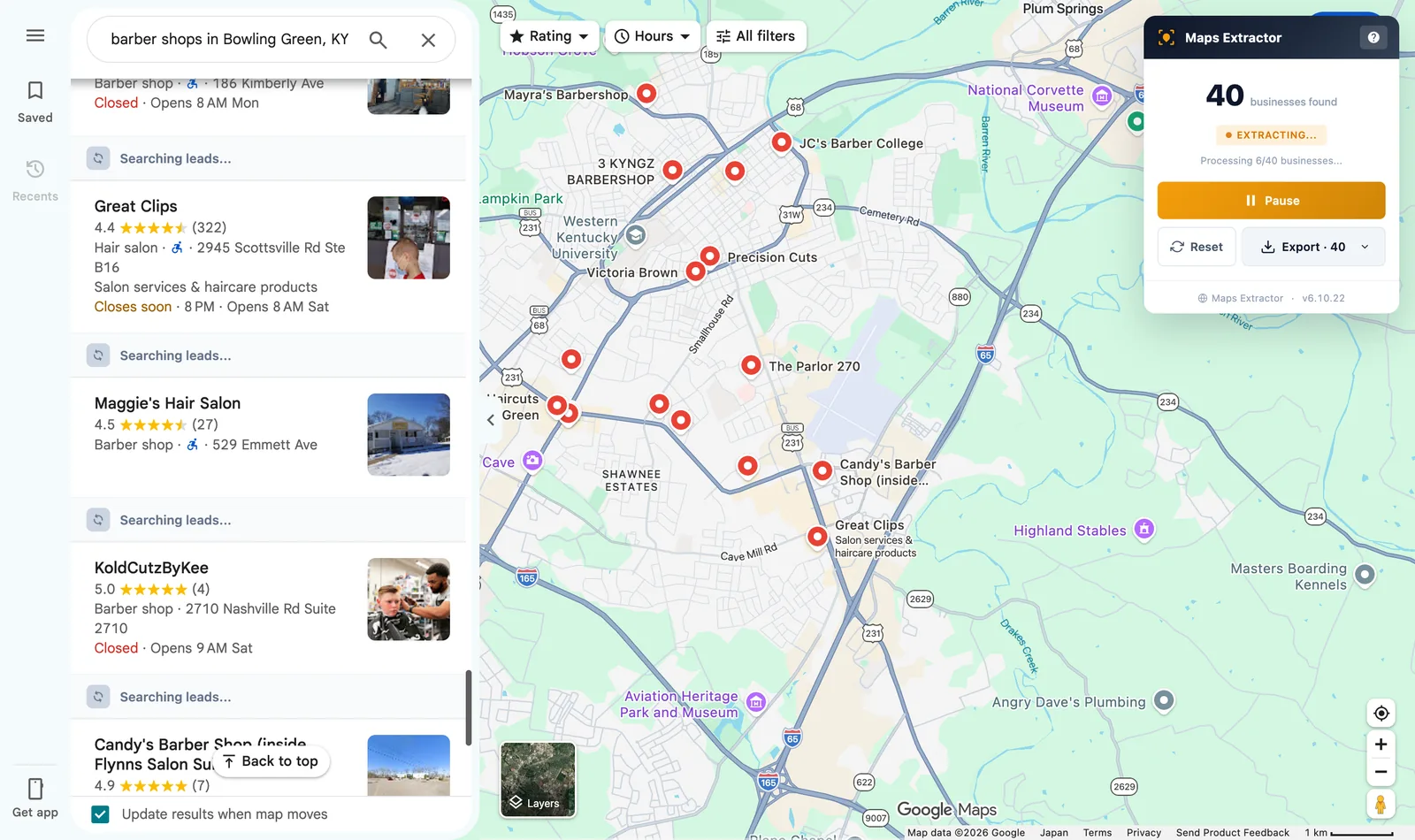
Google Maps lists up to about 120 businesses for one search, but that isn't where the extension stops. When the list ends, drag the map and it keeps adding the businesses in each new area to the same list, so one session can cover a whole city. More on that below.
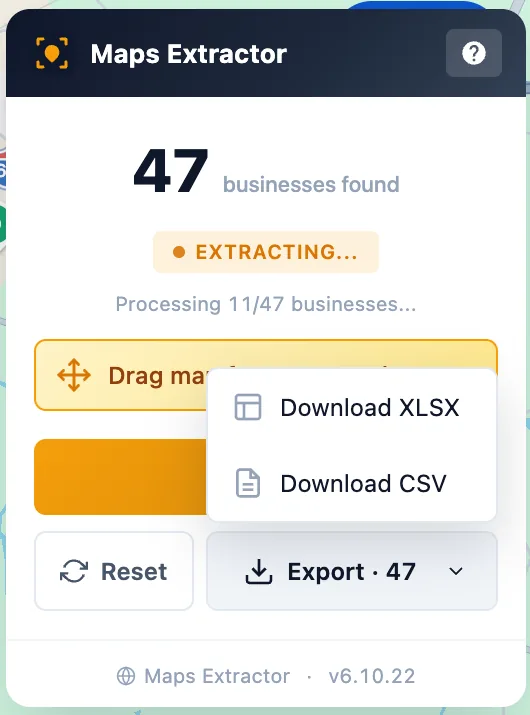
3. Export to Excel or CSV
Click Export and choose Download XLSX or Download CSV. Each business is one row with 29 columns, including name, phone, address, website, rating, review count, opening hours and whether the listing is claimed.
4. Filter the Website column
Open the file in Excel or Google Sheets:
- Excel: click a cell in the header row, choose Data › Filter, open the filter on the Website column, clear Select All and tick (Blanks).
- Google Sheets: choose Data › Create a filter, open the filter on Website, choose Filter by values, click Clear and tick (Blanks).
What's left is every business with no website. To also catch the ones whose "website" is a social or booking page, add a column with this formula in Google Sheets and filter it for "No own site" (Website is column O in our export):
=IF(OR(O2="", REGEXMATCH(LOWER(O2), "facebook|instagram|linktr|vagaro|booksy|thecut|square|glossgenius|styleseat|sites\.google")), "No own site", "")
In Excel, use Text Filters › Contains on the Website column instead, one platform at a time.
Here's the whole workflow in a one-minute video:
| By hand in Google Maps | With Google Maps Extractor | |
|---|---|---|
| Businesses per search | the ones you open | every business in the results, and more as you drag the map |
| Your work | open each listing, check the Website line, copy the details | one click to start, one to export |
| What you end up with | the details you copied | 29 columns per business, ready to filter and sort |
What we found in 4 US cities
To see where businesses without websites actually are, we ran the export above for eight trades in four US cities of very different sizes, from Houston, Texas to Bowling Green, Kentucky.
How we tested. In November 2026 we searched Google Maps for "[trade] in [city], [state]" and exported the full result list of each search with Google Maps Extractor: 32 searches and 3,358 businesses after removing duplicates. A business counted as having no website if its Website field was empty, and as social or booking page only if the field pointed to a social profile, a Linktree, a booking platform such as Vagaro, Booksy, TheCut or Square, or a free page on Google Sites or Wix. Chains that link to their head office site counted as having a website.
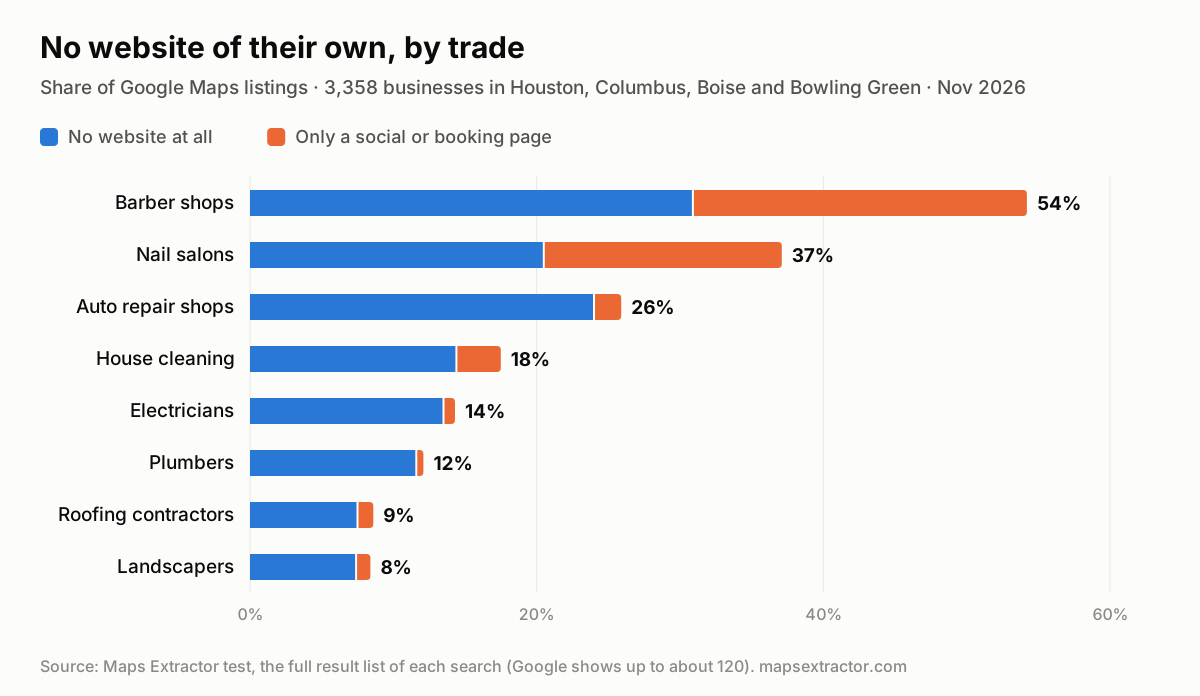
| Trade | Listings | No website | Social or booking page only | No website of their own |
|---|---|---|---|---|
| Barber shops | 404 | 31% | 23% | 54% |
| Nail salons | 415 | 21% | 17% | 37% |
| Auto repair shops | 484 | 24% | 2% | 26% |
| House cleaning | 416 | 14% | 3% | 18% |
| Electricians | 393 | 14% | 1% | 14% |
| Plumbers | 389 | 12% | 1% | 12% |
| Roofing contractors | 466 | 8% | 1% | 9% |
| Landscapers | 391 | 7% | 1% | 8% |
Percentages are rounded, so a row may not add up exactly. Three things stood out.
Trade matters more than anything else. Barber shops were six times as likely as landscapers to have no website of their own. Roofers, electricians and plumbers mostly have sites; they compete on searches like "roof repair near me", where a site earns its keep.
In beauty trades, booking pages stand in for websites. 23% of barber shops and 17% of nail salons listed a social or booking page as their website, and for barbers most of these were booking pages on Booksy, Square, TheCut and the like. These owners already pay for online booking. What they lack is a site of their own that shows their work and carries their name.
Smaller cities have more.
| City | Listings | No website | No website of their own |
|---|---|---|---|
| Houston, TX | 965 | 11% | 16% |
| Columbus, OH | 960 | 15% | 21% |
| Boise, ID | 962 | 15% | 22% |
| Bowling Green, KY | 471 | 30% | 38% |
Bowling Green returned fewer listings because there are fewer businesses to show. The gap held across trades: 74% of its barber shops (43 listings) and 60% of its nail salons (55 listings) had no website of their own. Nail salons varied the most between cities, from 8% in Houston to 54% in Boise.
These aren't abandoned listings
You might expect listings without a site to be dead or tiny. Mostly they're not:
| No website of their own (747) | Own website (2,611) | |
|---|---|---|
| Phone number listed | 95% | 99% |
| Listing claimed by the owner | 80% | 97% |
| Median number of reviews | 44 | 98 |
| Fewer than 10 reviews | 23% | 8% |
A median of 44 reviews means the typical business on the list has real customers, and 95% can be called. One in five hadn't claimed its Google listing, against 3% of businesses with a website, which gives you a second easy thing to offer: claiming and filling in the profile.
Limits of this test
- We didn't drag the map, so each search gave us the list Google shows, up to about 120 businesses. Google tends to rank well-known, well-reviewed businesses higher, so newer ones, which are more likely to have no website, are under-counted. Searching smaller areas, as described below, turns up more of them.
- Google located our test browser in Japan (Google Maps showed "Japan" at the bottom of the map). Every search named a US city and returned businesses in that city, but the order may differ a little from what a local searcher sees.
- This is a snapshot of four cities in November 2026, not a national survey. For the national picture, Clutch's survey above is the better guide.
How to find businesses without websites near you
"Near me" searches use your location, so they work when you're prospecting your own area. To cover it properly:
- Drag the map. Tick Update results when map moves at the bottom of the results, then drag or zoom the map, and Google loads the businesses in the new area. When a list runs out, Google Maps Extractor shows Drag map for more results and keeps adding new businesses to the same list as you move, so you aren't stuck with the roughly 120 that one search shows.
- Search smaller areas. Searching by ZIP code or neighborhood ("barber shops 42101", "plumbers in Clintonville, Columbus") brings up businesses that never make a citywide top 120.
- Try other words for the trade. "Barber", "barbershop" and "men's haircut" return overlapping but different results. If you combine several exports, remove duplicates with the Place Id column.
Other places to find businesses without websites
Google Maps has the most local businesses in one place, but it isn't the only source:
| Source | How to search it | Best for | Watch out for |
|---|---|---|---|
| Search pages for a trade and a town; check each page's About section for a website | Businesses whose Facebook page is their website | No export, so it's slow | |
| Search a trade and a town; check each bio for a link | Salons, barbers, food | Most contact happens by direct message | |
| Yelp | Search a category and city; open listings and look for a website link | Restaurants and home services | Checking listings one by one is slow |
| Bing Maps | Search like Google Maps; listings have a website field. Our free Bing Maps Extractor exports them the same way | A second directory to cross-check | Coverage differs from Google's, so expect gaps |
| Chamber of commerce directories | Browse the member list on the local chamber's site | Established local businesses | Small lists |
| State license lookups | Search contractor or cosmetology licenses by city | Licensed trades, including new ones | Usually no phone or website; you'll need to look them up |
Which businesses to contact first
Not every business without a website is a good prospect. Sort your list with the columns you exported. These signals are a good place to start:
| Signal | Column | Why it matters |
|---|---|---|
| No website, or only a social or booking page | Website | It's the problem you solve |
| 10 to 200 reviews | Review Count | Busy enough to pay, small enough that you'll talk to the owner |
| Rating of 4.0 or higher | Average Rating | Happy customers to show off on a site |
| Listing not claimed | Claimed | An easy first win: claim and complete the profile |
| Phone number listed | Phone | You can reach them today |
| Opening hours filled in | Opening hours | The business is active |
Start with the businesses that tick the first three. A barber shop with 150 reviews, a 4.8 rating and a Booksy page as its website has steady customers and already pays for software. That's a much easier conversation than a listing with two reviews.
How to pitch a business with no website
Owners without a website have usually heard the pitch before. What gets a reply is showing that you looked at their business in particular.
Lead with what you saw. Mention their rating, their review count and where you found them: "You've got 140 reviews at 4.8 stars on Google, but there's no website on your listing." It proves the message isn't a mass mailing, and it points at a real gap: customers who want to see prices, photos or services before they call have nowhere to look.
Call first. 95% of the businesses on our list showed a phone number. Most don't publish an email address, and Google Maps Extractor finds an email for only a small share of businesses without a website, so the phone and their social pages are usually the way in.
A phone opener:
"Hi, is this [owner]? I'm [name], I build websites for [trade] businesses in [town]. I found you on Google Maps. You've got [number] great reviews, but there's no website on your listing. Is that something you've thought about, or is now a bad time?"
A voicemail:
"Hi, this is [name] from [company]. I noticed [business] has great reviews on Google Maps but no website on the listing. I've put together a quick idea of what one could look like for you. Call me back at [number] and I'll walk you through it."
An email, for the ones with an address or a contact form:
Subject: [Business name] on Google Maps
Hi [name],
I came across [business] on Google Maps: [rating] stars from [number] reviews. Your listing [has no website / links to your Booksy page], so anyone who wants to see your work or prices before booking has to call or look elsewhere.
I build simple websites for [trade] businesses that show your work, prices and reviews and link straight to your booking page. Here's one I made for [similar business]: [link].
Worth a 10-minute call this week?
[Your name], [company], [postal address]
If you'd rather not hear from me again, reply "no thanks" and I won't write again.
Follow up, but not forever. A simple rhythm: call on day 1, email or message on day 3, call again on day 7, send a last note on day 14. Then move on, and keep a list of who said no.
Follow the rules. In the US, the CAN-SPAM Act covers commercial email, and it makes no exception for email to businesses. The FTC's compliance guide lists what each message needs, including honest sender details and subject lines, your valid postal address and a clear way to opt out, and opt-out requests must be honored within 10 business days. Other countries have stricter rules for cold email and calls, so check the rules where your prospects are.
Common mistakes
- Trusting an empty Website field. Check the business name on Google and their social pages before you pitch, or your first call ends with "we already have one".
- Skipping businesses whose "website" is Facebook or a booking page. In our data they were 6% of all listings and 23% of barber shops, and they're often the best prospects because they already market online.
- Only searching the big city. Bowling Green had more than twice Houston's share of businesses with no website of their own (38% against 16%).
- Stopping at the first 120 results. One Google Maps search lists about 120 businesses. Drag the map, or search by ZIP code and neighborhood, to reach the rest.
- Pitching "a website". Owners want more calls and bookings, not pages. Talk about what their customers can't do today: see prices, photos and reviews in one place, or book without calling.
- Sending bulk email without the basics. Leaving out your postal address or an opt-out breaks CAN-SPAM, and generic messages get ignored anyway.
Frequently asked questions
How do I find businesses without websites near me?
Search Google Maps for a trade and your town or ZIP code, open each listing and look for a missing Website line. To check a whole area at once, export the searches with Google Maps Extractor and filter the Website column for blanks.
Can Google Maps show only businesses without a website?
No. Google Maps has filters for things like rating and opening hours, but none for websites. Export the search to a spreadsheet and filter the Website column instead.
What percentage of small businesses don't have a website?
About 17%, according to Clutch's 2025 small business survey. In our test of 3,358 Google Maps listings, 16% listed no website, and 22% had no website of their own once Facebook and booking pages are counted.
Which businesses are least likely to have a website?
In our data, barber shops (54% with no website of their own), nail salons (37%) and auto repair shops (26%). Roofers, landscapers, plumbers and electricians mostly had one.
Is it legal to contact businesses that don't have a website?
In the US, generally yes, if you follow the rules: commercial email to businesses falls under the CAN-SPAM Act, which requires things like your postal address and a way to opt out. Rules in other countries can be stricter, so check where your prospects are. This isn't legal advice.
Is there a free way to find businesses without websites?
Yes. Checking Google Maps listings by hand is free. Google Maps Extractor has a free plan with 1,000 credits every month (see pricing), and Bing Maps Extractor is free for Bing Maps.
Do businesses without websites have email addresses?
Most don't publish one. Google Maps Extractor finds an email for a small share of them; for the rest, call or message them on their Facebook or Instagram page.
How do I find businesses without websites on Facebook?
Search Facebook pages for a trade and a town, open each page and check the About section for a website link. Pages that link nowhere, or only to a booking page, are your leads. It's slower than Google Maps because you can't export the results.

About the Maps Extractor team
We've been building lead generation tools since 2022, including Google Maps Extractor and Bing Maps Extractor, browser extensions that turn map searches into lead lists. Our guides draw on what we learn building and testing them.
More about us →